Moving from Pocket
Pocket closed in July 2025 and its export tool followed that October. If you downloaded your saves, ShareMe reads the file and gives them a new home: the same links, tags and dates, plus a reader view and offline copies.
What is in your Pocket export
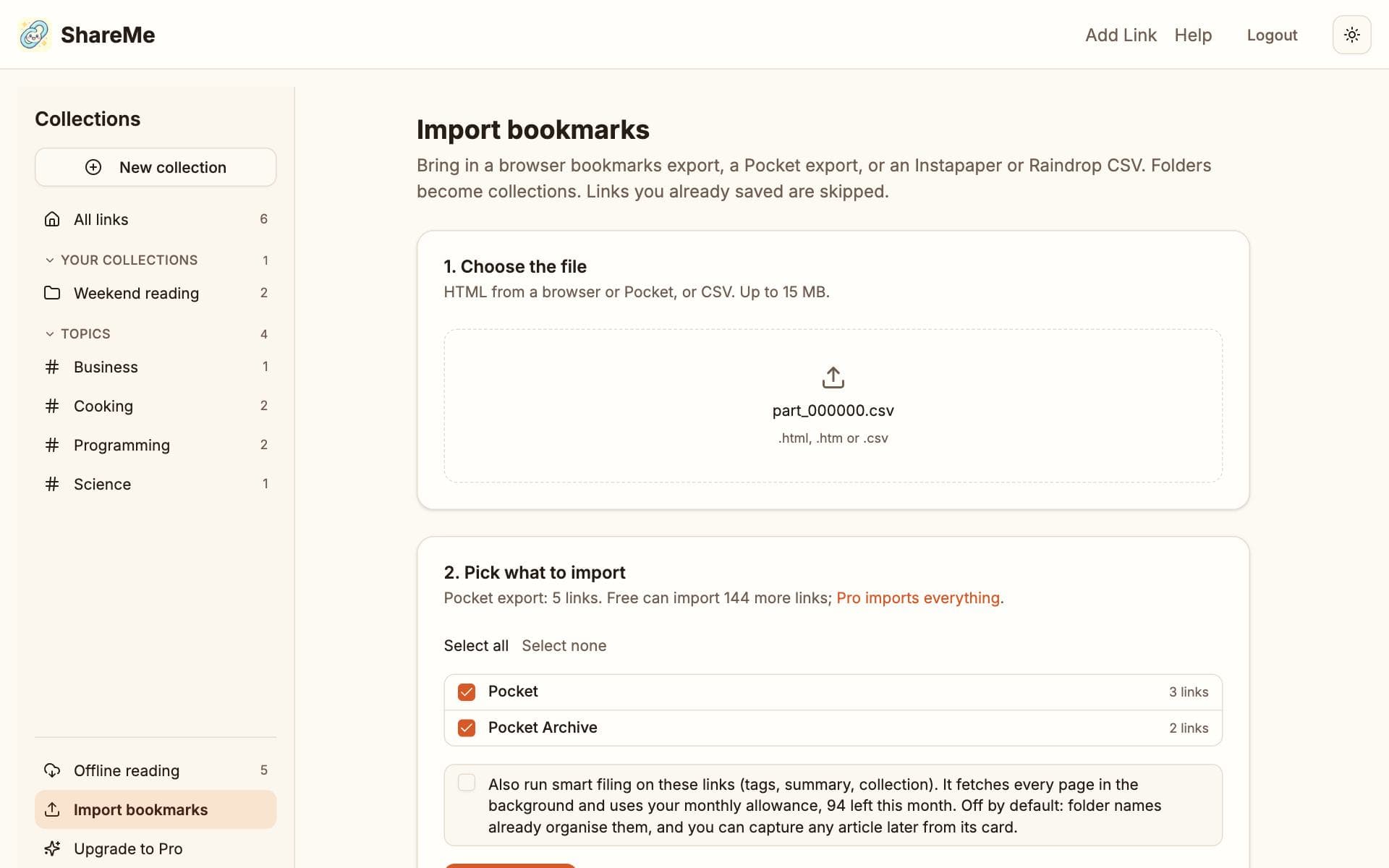
The export Pocket handed out in 2025 is a ZIP file holding a spreadsheet, part_000000.csv (very large libraries got more than one part), with each save's title, address, date, tags and whether it was unread or archived. Exports from before 2025 are a single HTML file, ril_export.html, with an Unread and a Read Archive list. ShareMe reads both; unzip the ZIP first and upload each CSV.
- Every link keeps its title, its address and the date you saved it in Pocket.
- Your Pocket tags become your tags in ShareMe.
- Unread items land in a collection called Pocket, archived ones in Pocket Archive.
- Links you already have in ShareMe are skipped, so importing twice does no harm.
Import it
- Open Import bookmarks and choose the CSV (or the old HTML file).
- The preview says Pocket export and shows the two folders with counts. Untick Pocket Archive if you only want what you had not read yet.
- Decide about smart filing (below), then import.
Big libraries and the Free limit
Free holds 150 links, and a Pocket library is often bigger. The import fills up to the limit and tells you how many it left out. Either start with the Pocket folder alone, or go Pro ($5 a month, $40 a year, or $79 once) and bring everything in one go.
Articles and smart filing
Imported links arrive with their title and date only; nothing is fetched, so a two-thousand-link file costs nothing. There are two ways to get the readable copies, tags and summaries:
- Tick Also run smart filing when you import. ShareMe fetches every page in the background and files it. Each link uses one filing from your monthly allowance, which is 100 a month on Free and unlimited on Pro, so on Free a big library takes a few months or a smaller selection.
- Or leave it off and use Capture article on a card whenever you open one. That fetches and files that single link, one filing at a time.
What changes from Pocket
| In Pocket | In ShareMe |
|---|---|
| Save from the share sheet | The same on Android once ShareMe is installed. On iPhone, paste the link or use a Shortcut; on a computer, the bookmarklet. |
| Tags | Your tags stay yours. The AI adds its own on top and files each link into a topic collection. |
| Archive | No archive. Collections do that job; your archived items sit in Pocket Archive. |
| Highlights | Not in ShareMe. |
| Reader view | Yes, with the reading time on each card, and search looks inside the text. |
| Offline | Your newest articles stay on the device: ten on Free, unlimited on Pro. |
| Recommendations | None. ShareMe shows what you saved and what people share with you, nothing else. |
Then carry on as with any other saves: saving links, collections and reading offline.